
Roles and Permissions
TaskView uses a role-based access control (RBAC) system. You create roles, assign permissions to those roles, and then assign roles to team members. This way you define once what a "Developer" or "Viewer" can do, and simply assign that role to new people.
How it works
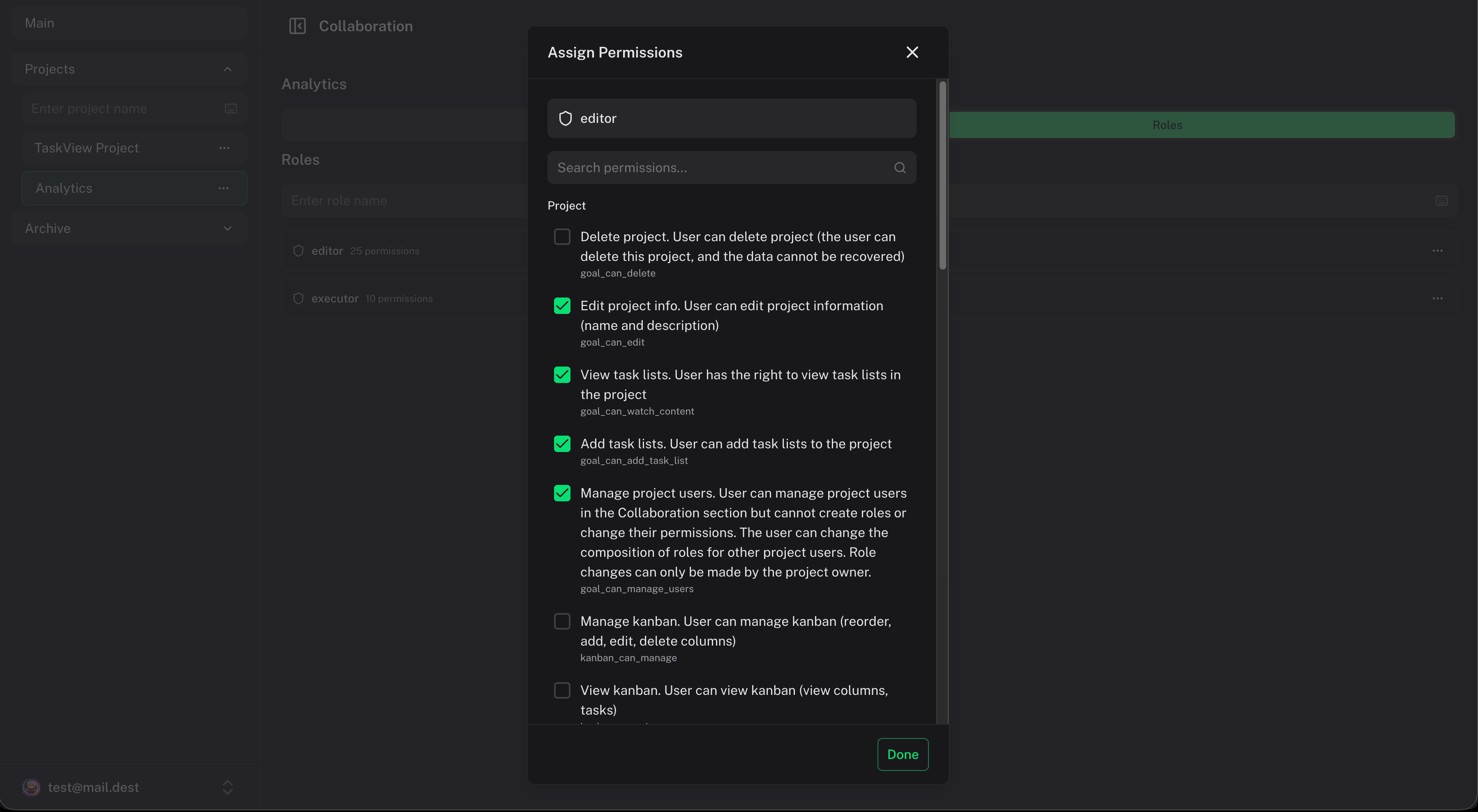
Each project has its own set of roles and permissions. A role in one project doesn't affect access in another.
The chain is simple:
Permission → assigned to → Role → assigned to → User
A user can have one or more roles per project. Their permissions are the sum of what that role allows.
Creating roles
- Go to the Collaboration tab in a project
- Open the Roles section
- Click Add Role and give it a name (like "Developer", "Designer", "Viewer")
Assigning permissions to a role
After creating a role, toggle the permissions you want to grant. Permissions are grouped by area:
Project permissions
| Permission | Key | What it allows |
|---|---|---|
| Delete project | goal_can_delete | Permanently delete the entire project |
| Edit project | goal_can_edit | Rename the project, change color |
| Manage users | goal_can_manage_users | Add/remove team members, assign roles |
| Add lists | goal_can_add_task_list | Create new task lists in the project |
| View lists | goal_can_watch_content | See the list of task lists (not the tasks inside) |
List permissions
| Permission | Key | What it allows |
|---|---|---|
| Delete list | component_can_delete | Remove a task list and its contents |
| Edit list | component_can_edit | Rename a task list |
| View tasks | component_can_watch_content | See tasks inside a list - their title, status, deadlines, and times |
| Add tasks | component_can_add_tasks | Create new tasks in a list |
Task permissions
| Permission | Key | What it allows |
|---|---|---|
| Delete task | task_can_delete | Permanently remove a task |
| Edit description | task_can_edit_description | Change the task title |
| Edit status | task_can_edit_status | Toggle the completion checkbox |
| Edit note | task_can_edit_note | Modify the rich-text note |
| View note | task_can_watch_note | See the note editor |
| Edit deadline | task_can_edit_deadline | Set or change start/end dates and times |
| View details | task_can_watch_details | Open the task detail panel (works only in UI) |
| View subtasks | task_can_watch_subtasks | See the subtasks section |
| Add subtasks | task_can_add_subtasks | Create subtasks |
| Edit tags | task_can_edit_tags | Add or remove tags on a task |
| View tags | task_can_watch_tags | See which tags are attached |
| View priority | task_can_watch_priority | See the task priority |
| Edit priority | task_can_edit_priority | Change the task priority |
| View history | task_can_access_history | See the change history of a task |
| Restore history | task_can_recovery_history | Restore a task to a previous state |
| Assign users | task_can_assign_users | Add or remove assignees |
| View assignees | task_can_watch_assigned_users | See who is assigned to a task |
Kanban permissions
| Permission | Key | What it allows |
|---|---|---|
| View Kanban | kanban_can_view | See the Kanban board |
| Manage Kanban | kanban_can_manage | Create, edit, delete status columns and move tasks |
Graph permissions
| Permission | Key | What it allows |
|---|---|---|
| View graph | graph_can_view | See the dependency graph |
| Manage graph | graph_can_manage | Create and remove task dependencies |
Integration permissions
| Permission | Key | What it allows |
|---|---|---|
| View integrations | integrations_can_view | See connected GitHub/GitLab integrations |
| Manage integrations | integrations_can_manage | Add, remove, toggle, and sync integrations |
Assigning roles to users
In the Collaboration tab, find the user and select a role from the dropdown. The permissions take effect immediately.
The project owner
The project owner automatically has all permissions. You don't need to assign a role to the owner - they can always do everything.
Tips
- Start with 2-3 roles - "Admin" (everything), "Member" (create and edit), "Viewer" (read only). Add more specific roles only if you need them.
- Review permissions when something feels wrong - if someone can't edit a task or see the Kanban board, it's almost always a missing permission on their role.
- Permissions are enforced on both client and server - even if someone inspects the UI or calls the API directly, the server checks permissions before allowing any action.
Team Members
Invite team members to TaskView projects by email, assign tasks, manage access, and control visibility. Built-in collaboration tools with project ownership and role assignment for self-hosted project management.
Frequently Asked Questions
Common questions about TaskView - self-hosted source-available task and project management. Installation, features, security, Docker deployment, team collaboration, and more.